Using tractography models
In both cases, the input data must be formatted as an hdf5. See Converting your data into a hdf5 file for more information.
Hdf5 preparation for our two tractography models
Examples below suppose that your hdf5 has the following properties:
A subject $subj on which you want to run the tractography.
An hdf5 volume group called ‘inputs’, which contains the input data for the model
An hdf5 volume group called ‘seeding_mask’, which contains a binary mask for the seeds placement (ex, the WM-GM interface).
An hdf5 volume group called ‘tracking_mask’, which contains a binary mask for the tractography (ex, the white matter).
The config file below can be used for Learn2track and TractoTransformer:
{
    "input": {
        "type": "volume",
        "files": ["anat/*__T1w.nii.gz", "dwi/*__fa.nii.gz", "dwi/*__fodf.nii.gz"],
        "standardization": "per_file",
        "std_mask": ["masks/*__brain_mask.nii.gz"]
    },
    "wm_mask": {
        "type": "volume",
        "files": ["masks/*__mask_wm.nii.gz"],
        "standardization": "none"
    },
    "interface_mask": {
        "type": "volume",
        "files": ["other_masks/*__interface.nii.gz"],
        "standardization": "none"
    },
}
Tracking from a model
AI-based tractography is similar to classical tractography, except the inputs are sent throughout the model at each point. This can be heavier in memory and requires some adaptation in the code. Our tracking scripts offer the possibility to track many streamlines at once, in order to make it efficient. All streamlines are sent in the model at once. Options below are common to our two models:
--use_gpu: If your computer has a GPU, we strongly recommand using it. Then, you may also track many streamlines at once for an efficient usage of the model. Use option--simultaneous_tracking. For instance, with 10Gb GPU, we could launch ~500 streamlines at the time.
--algo: Choices are ‘det’ or ‘prob’. Depending on the choice of output (regression, classification, etc.), the model may not support probabilistic tractography.
-max_length: Useful to avoid tracking long sequences.--min_lengthis used as post-tractography filtering.
--eos_stop: If your model was created with an EOS option (end of streamline), you can use the learned EOS probability as an additionnal stopping criteria during tracking.
--tracking_mask: This option is facultative if you use--eos_stop.
--discard_last: If a tracking mask is used, default is to stop when leaving the mask, but to keep the last point. You can ensure all points are inside the tracking mask with option discard_last.
-npv: Number of seeds per voxel in the seeding mask.
--help: Use the help to learn more about other options.
Required parameters are:
experiment_path: Where your experiment folder is. It should contain a “best_model” sub-folder.
subj_id: A subject in your hdf5 file.
input_group: The name of the hdf5 volume group to use as input in the model.
out_tractogram: The ouput filename.
seeding_mask_group: The name of the hdf5 volume group to use as seeding mask.
You can use your favorite .trk visualizer (ex, Mi-Brain) to view the local loss along points of your streamlines. This example supposes your hdf5 has a subject $subj, a volume group ‘input’ as input to the model, and examples of streamlines in the streamlines group ‘streamlines’:
l2t_visualize_loss my_experiment $hdf5 $subj input --out_prefix colored_tractogram \
    --use_gpu --batch_size 400 --streamlines_group streamlines \
    --colormap turbo --show_now --compute_histogram   --save_colored_tractogram \
    --save_colored_best_and_worst 0.5
TractoTransformers (tt)
This uses transformers and should be the subject of an upcoming publication. Its name, TractoTransformer, reflects that this model is similar to the one proposed in Waizman et al., 2025. Others have also published Transformer models for Tractography, but did not name their model.
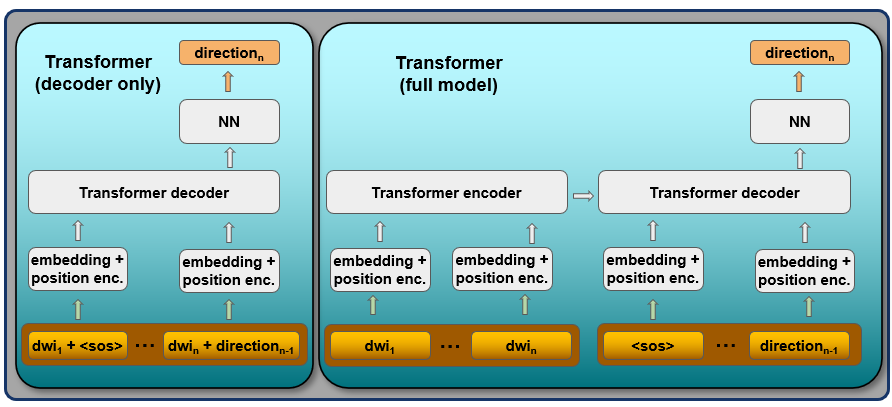
To use this model, run script tt_track_from_model.py. For instance:
tt_track_from_model -f -v \
    --algo det --min_length 10 --max_length 200 \
    --npv 1 --use_gpu --simultaneous_tracking 500 --discard_last \
    --tracking_mask_group $wm_mask --eos_stop 0.5  --hdf5 $hdf5_file \
    $experiment_folder $tracking_subj $input out_tractogram.trk \
    $interface_mask
Learn2track (l2t)
This is a refactored version of the code prepared by authors of Poulin2017.
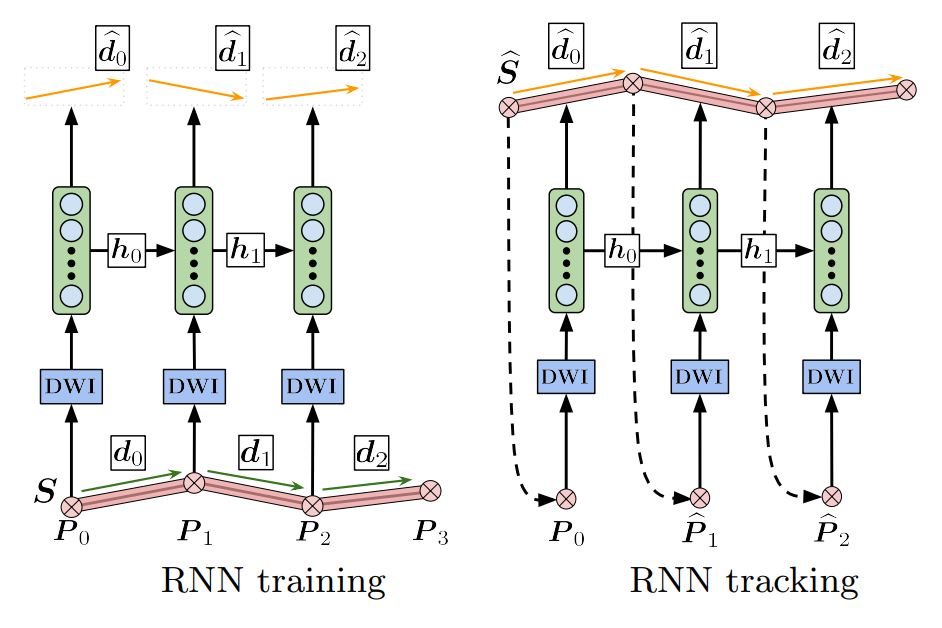
To use this model, run script l2t_track_from_model. For instance:
l2t_track_from_model -f -v \
    --algo det --min_length 10 --max_length 200 \
    --npv 1 --use_gpu --simultaneous_tracking 500 --discard_last \
    --tracking_mask_group $wm_mask --eos_stop 0.5  --hdf5 $hdf5_file \
    $experiment_folder $tracking_subj $input out_tractogram.trk \
    $interface_mask