Inherit from MainModelAbstract
Projects using diffusion imaging and tractography streamlines are usually quite heavy in memory. For this reason, dwi_ml is not only a space for models, but it also includes smart management of data loading during training. Our training objects (see Training your model for more information) and model objects are thus intertwined. For this reason, you should always make your model a child class of our MainModelAbstract.
The MainModelAbstract class
It is a derivate of torch’s Module, to which we added methods to make it compatible with our Trainer. During training (or validation), our Trainer will perform these operations:
for each epoch:
    batches = ... (batches are given by the BatchSampler)
    for each batch:
        data = ... (data is loaded and prepared by the BatchLoader)
        outputs = model(data)  # This calls model.forward()
        loss = model.compute_loss()

    model.save_checkpoint()
Our model:
defines the way to save the model at each checkpoint [1] and once the training is finished, with predefined methods[#f2]_:
save_params_and_state
load_model_from_params_and_state
defines the type of inputs the
forwardmethod will receive when called in the trainer.prepares a method
compute_loss, which will be called by our trainer during training / validation.has properties to tell BatchLoader how to prepare data, such as step_size, nb_points or compress_lines. These preprocessing steps are performed by the BatchLoader, but they probably influence strongly how the model performs, particularly in sequence-based models, as they change the length of streamlines. This is why these parameters have been added as main hyperparameters.
has some internal values for easier management, such as
self.deviceandself.context.
Where to start?
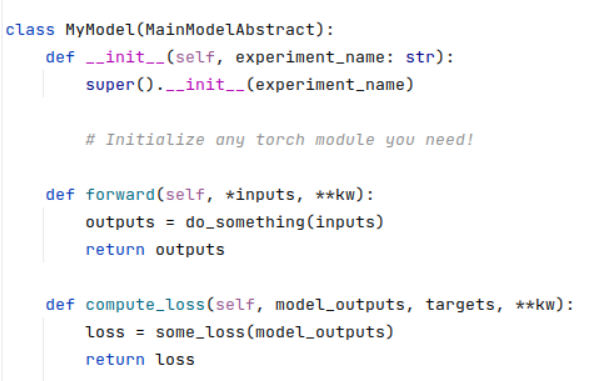
As a first step, try to implement a child class of dwi.general.models.main_models.main_abstract_model.MainModelAbstract and see how you would implement the two following methods: forward() (the core of your model) and compute_loss().
Create a new file in
src/dwi_ml/projects/my_projectnamed my_project.pyStart your project like this:
Learn to use your model in our Trainer (see page Training your model).
Discover the optional parameters of the
MainModelAbstractmodel.Before coding everything else from scratch in our model, verify if it could inherit from our other models (see page You may inherit from many models!) to benefit from their methods.